class SingleCommandSFTP(object):
    """
    SingleCommandSFTP is a simple abstraction of the the Paramiko
    SFTP client.

    http://www.lag.net/paramiko/docs/paramiko.SFTPClient-class.html

    e.g.
        sftp_client = SingleCommandSFTP(host     = "hostname",
                                        username = "username",
                                        password = "password")

        sftp_client.remove(path = '/mnt/a/b/file.txt')

    It is intended mainly for single operations as the
    connection is opened and closed for each command.
    For multiple commands it will be inefficient.
    """

    def __init__(self,
                 host,
                 username,
                 password,
                 port = 22):

        self.host     = host
        self.username = username
        self.password = password
        self.port     = port


    def __open(self):
        self.transport = paramiko.Transport((self.host,
                                             self.port))
        self.transport.connect(username = self.username,
                               password = self.password)
        self.sftp_client = paramiko.SFTPClient.from_transport(self.transport)


    def __close(self):
        self.sftp_client.close()
        self.transport.close()

    def __run_command(self,
                      command,
                      **params):

        """
        Call to a paramiko.SFTPClient.'command' instance method.
        """

        log.info('sftp_client.{command}({parameters})'.format(command    = command,
                                                  parameters = params))
        self.__open()
        method = getattr(self.sftp_client,command)
        method(**params)
        self.__close()


    # instance methods using __run_command for all instance methods of SFTPClient
    # are added once, dynamically, below.
    # SFTPClient Reference can be found at http://www.lag.net/paramiko/docs/paramiko.SFTPClient-class.html


def instance_method_code_string(object,attr):
    argspec = inspect.getargspec(getattr(object,attr))
    parameters = [arg for arg in argspec.args]
    if argspec.defaults:
        for index in range(len(argspec.defaults)):
           try:
               parameters[-1-index]+='="' + argspec.defaults[-1-index] + '"'
           except:
               parameters[-1-index]+='=%s' %argspec.defaults[-1-index]
    if argspec.varargs:
        parameters.append['*'+argspec.varargs]
    if argspec.keywords:
        parameters.append['*'+argspec.keywords]

    code_string = "def {name}({parameters}):\n".format(name       = attr,
                                                       parameters = ','.join(parameters))
    code_string +="    self._SingleCommandSFTP__run_command(command='{name}',{parameters}"\
                  .format(name       = attr,
                          parameters = ','.join('{p}={p}'.format(p=p) for p in argspec.args[1:]))

    if argspec.varargs:
        code_string +='*'+argspec.varargs
    if argspec.keywords:
        code_string +='**'+argspec.keywords

    code_string +=")\n"
    return code_string

def add_SFTPClient_equivalent_instance_methods_to_SingleCommandSFTP():

    instance_method_names = [attr for attr in dir(paramiko.SFTPClient) if getattr(paramiko.SFTPClient,attr).__class__==paramiko.SFTPClient.__init__.__class__ and attr[0]!='_']

    for instance_method_name in instance_method_names:
        code_string = instance_method_code_string(object=paramiko.SFTPClient, attr=instance_method_name)
        exec(code_string)
        setattr(SingleCommandSFTP,instance_method_name, eval(instance_method_name))


if 'instance_methods_added' not in dir():
    instance_methods_added = True
    add_SFTPClient_equivalent_instance_methods_to_SingleCommandSFTP()
getattr, setattr, eval, exec, getargspec. I won't have bloody clue what this does in two weeks' time!
Thursday, 1 May 2014
Dynamically adding instance methods.
I've been playing with some code today. It works, but may well be too clever for its own good. It may be slightly insane. There may be much better ways to do this.
I'd written a little class (SingleCommandSFTP) to make some other code a little shorter and neater. With one command, it was no problem, but when it expanded to three, the duplication of calls to __open and __close irked a little, so I added __run_command. The pragmatic thing to do was to stop. But unfortunately, I was having fun, and wondered about dynamically adding instance methods to call __run_command for all the available commands.
I ended up with this:


Saturday, 5 April 2014
#RedirectToAppStoreAdsSuck
#RedirectToAppStoreAdsSuck
I'm getting a bit fed up with ads in my browser redirecting me to the App Store. So I decided to install the apps (if they are free), immediately remove them, and leave a negative review.
I suggest we all do this if we have a spare minute. The danger is that the apps climb the charts, but I found the process to be cathartic.
Feel free to cut and paste the text below into the review.
"I Installed and immediately deleted this app without opening it in order to leave this negative review to complain about being redirected to the App Store from an ad in a web page.
Seriously, this is an intensely intrusive, terrible way to try to get me to try your app.
Please stop!
#RedirectToAppStoreAdsSuck"
Thursday, 19 December 2013
Markdown Pro and Syntax Highlighting
I've been writing some documentation for some code in markdown using Markdown Pro, but the code looked a little boring:
I've used Alex Gorbatchev's Syntax Highlighter on Blogger, so I figured I could use it for these pages too.
This worked quite well, and I wrote a script (thinking that I was being clever) to add the syntax highlighter code to all the HTML files in a folder hierarchy. The only problem was that the syntax highlighting code isn't shown in the Markdown HTML view, XML inside pre tags was blank.
A couple of days ago, I started tweaking the Markdown Pro generated css to make the tables a bit nicer and colours of headings stand out a little more. Last night, as I was dropping off to sleep, it occurred to me that I may be able to add the highlighter css and javascript to a Markdown Pro template too. Just tried it, and it works. The template has to be re-applied to refresh after changes in order to force the javascript to run. Export to HTML is still good. It's necessary to refresh in order to save the highlighted code to PDF.
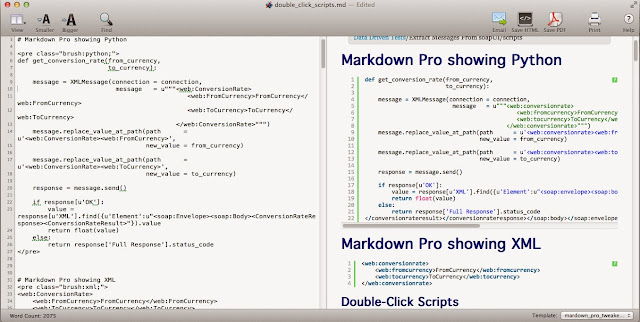
Note that the 'template' isn't the usual simple template, but all of the exported css that Markdown Pro would generate on exporting to HTML, (with <script> tags).
(The 'template' file is here if you're curious)
def func(blah):
    pass
I've used Alex Gorbatchev's Syntax Highlighter on Blogger, so I figured I could use it for these pages too.
def func(blah):
    pass
This worked quite well, and I wrote a script (thinking that I was being clever) to add the syntax highlighter code to all the HTML files in a folder hierarchy. The only problem was that the syntax highlighting code isn't shown in the Markdown HTML view, XML inside pre tags was blank.
A couple of days ago, I started tweaking the Markdown Pro generated css to make the tables a bit nicer and colours of headings stand out a little more. Last night, as I was dropping off to sleep, it occurred to me that I may be able to add the highlighter css and javascript to a Markdown Pro template too. Just tried it, and it works. The template has to be re-applied to refresh after changes in order to force the javascript to run. Export to HTML is still good. It's necessary to refresh in order to save the highlighted code to PDF.

Note that the 'template' isn't the usual simple template, but all of the exported css that Markdown Pro would generate on exporting to HTML, (with <script> tags).
(The 'template' file is here if you're curious)
Monday, 9 December 2013
SFTP Python Paramiko (and some of the problems I had)
I needed to rename a file on a RHEL server as part of some test automation scripts. Hope this helps.
It only has rename, but that's all I need for now. It would probably be worth making a decorator for the _open / _close functions if many more functions were to be added, but I don't quite know how to do that (yet).
I also had to install the ECDSA cryptographic signature library as this wasn't found when importing paramiko.
I used paramiko to do it with SFTP. I pretty much copied some code from Stack Exchange to make this:
import paramiko

class SingleCommandSFTP(object):
    def __init__(self,
                 host,
                 username,
                 password,
                 port = 22):

        self.host = host
        self.username = username
        self.password = password
        self.port = port


    def _open(self):
        self.transport = paramiko.Transport((self.host,
                                             self.port))
        self.transport.connect(username = self.username,
                               password = self.password)
        self.sftp_client = paramiko.SFTPClient.from_transport(self.transport)


    def _close(self):
        self.sftp_client.close()
        self.transport.close()

    def rename(self,
               source,
               destination):

        self._open()
        self.sftp_client.rename(oldpath = source,
                                newpath = destination)
        self._close()

    # Add further commands as and when required.
It only has rename, but that's all I need for now. It would probably be worth making a decorator for the _open / _close functions if many more functions were to be added, but I don't quite know how to do that (yet).
Problems (Mac):
If you try to easy_install paramiko on Mavericks, it'll probably fail because it can't compile pycrypto. You need to install Xcode and fiddle about a bit (Found at Stack Exchange and Abakas):- In Xcode, go Preferences > Downloads, and click on the "Install" button next to "Command Line Tools" to install the compiler needed by Python.
- sudo ln -s /usr/bin/gcc /usr/bin/gcc-4.2
Problems (Windows):
On Windows, it wasn't practical to install a suitable compiler to build pycrypto from source. I used the 32-bit installer for Python 2.7 (downloads are here). I had installed Python for all users, but that caused another problem solved by Stack Exchange. I uninstalled Python an installed for the user only.I also had to install the ECDSA cryptographic signature library as this wasn't found when importing paramiko.
Tuesday, 29 October 2013
Mavericks "Mail Web Content" going to 100% CPU
If your fans are a blowin', check Activity Monitor/CPU (sorted by descending % CPU). You may see 'Mail Web Content' at the top, hogging 100%. I've also seen two instances hogging 100% each.


Bouncing Mail doesn't always do the trick. I've had some success with just killing the process, but YMMV.
I couldn't find any info on it from a quick Google.


My hypothesis is that it's HTML Mail rendering that's got it's knickers in a twist. When the process had been quit, the mesage I was reading was blank, but selecting another one and then coming back to the blank one ... it was rendered, and it was and HTML page.
Dunno if that helps anyone. Maybe it's enough to know you're not alone ?
Saturday, 25 May 2013
Is a blog subject a headline?
See what I did there?
http://daycoder.blogspot.com/2013/05/is-new-analogy.html
Subscribe to:
Posts (Atom)


 Posts
Posts


